
Why complex branching becomes spaghetti in no-code tools
Branching logic is the moment a simple workflow turns into a decision system: if the user is new, do A; if they’re returning, do B; if payment fails, do C; if a webhook arrives late, reconcile D. In most no-code builders, the first version ships fast because you can visually add conditions and actions. The problem starts later, when a dozen small exceptions get layered on top of each other. You end up with duplicated checks, hidden dependencies, and “one more condition” fixes that only work when executed in a specific order.
A practical way out is to treat branching logic like software architecture. You don’t need code to do that—you need repeatable patterns. The goal is simple: make decisions explicit, reduce repetition, and keep each branch easy to test and change.
A practical pattern library for branching logic
The patterns below are designed to work in any serious workflow builder, and they map cleanly to visual development platforms like WeWeb, where complex workflows and branching are first-class capabilities. When you need production-grade structure without losing the speed of visual iteration, a platform like weweb.io makes it easier to keep logic readable while connecting to databases and external APIs.
1) Guard clause pattern for fast exits
Use when: a workflow has prerequisites (auth, required fields, valid state) and should stop early if they aren’t met.
How it reduces spaghetti: instead of nesting everything inside “if valid,” you check invalid cases first and exit, keeping the main path straight.
- Check authentication; if missing, redirect or return an error.
- Check required inputs; if missing, show validation errors and stop.
- Check resource ownership/permissions; if not allowed, stop.
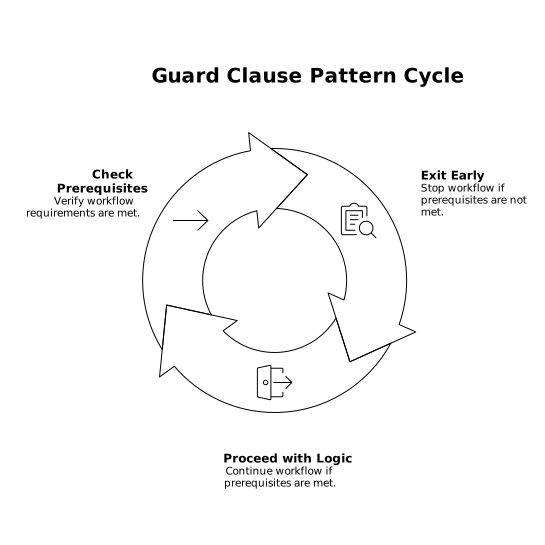
Implementation tip: visually group guards at the top of the workflow. Name them consistently (e.g., “GUARD: missing email”). This makes the rest of the flow read like a clean “happy path.”
2) Decision table pattern for many conditions
Use when: you have multiple inputs that combine into many outcomes (role + plan + status + region).
How it reduces spaghetti: nested IFs explode combinatorially. Decision tables centralize rules and prevent duplication.
- Create a small data structure (table/collection) where each row is a rule.
- Each rule has matching criteria (exact match or wildcard) and an outcome (action, route, message, next state).
- The workflow finds the first matching rule and executes the mapped outcome.
Practical example: route a support request based on account tier and issue type. Instead of branching into 10 nested checks, you match one row and set “assignedQueue = X.”
3) State machine pattern for lifecycle workflows
Use when: an entity moves through defined stages (lead → qualified → scheduled → closed; draft → submitted → approved → paid).
How it reduces spaghetti: you stop sprinkling “if status is…” everywhere and move to a single set of allowed transitions.
- Define states and allowed transitions explicitly.
- Attach side effects to transitions (notifications, timestamps, audit logs).
- Reject invalid transitions early (this pairs well with guard clauses).
Operational bonus: state machines are easier to troubleshoot because you can log: previous state, event, next state.
4) Router pattern for separating “decide” from “do”
Use when: a workflow decides what should happen, then performs one of several action sets.
How it reduces spaghetti: it prevents decision logic from being mixed with action logic.
- Router step: compute a single routing key (e.g., “route = refund_failed_payment”).
- Handlers: separate sub-workflows that each handle one route.
Naming convention: “ROUTE: …” for routing decisions, “HANDLE: …” for branches. When you open the workflow six months later, the structure is self-explanatory.
5) Normalization pattern for consistent inputs
Use when: conditions depend on messy inputs (free-form text, third-party statuses, inconsistent booleans, locale formats).
How it reduces spaghetti: you avoid writing multiple versions of the same check (“Paid”, “paid”, “PAID”).
- Normalize inputs once near the start (trim, lowercase, map enums).
- Convert third-party codes into internal canonical values.
- Store normalized values for later steps and logs.
This is especially important when workflows integrate multiple systems. If you’re also dealing with tracking gaps and attribution edge cases, it helps to understand shadow conversions and duplicate leads across ads, analytics, and CRM so your logic doesn’t “branch” on misleading signals.
6) Idempotency and replay-safe pattern for webhooks
Use when: the same event might arrive twice (webhooks, retries, queue processing, network timeouts).
How it reduces spaghetti: you avoid bolt-on “if already processed maybe…” checks scattered throughout the flow.
- Compute or read an event ID (from the provider or a hash of payload).
- Store processed event IDs with timestamps.
- If seen before, exit early (guard clause).
Security note: if your workflow depends on API tokens or signed events, keep replay risks in mind at the edge. For deeper background, see how to stop API token replay at the edge with TLS and device binding.
How to apply these patterns in real no-code builds
Start with a “happy path” spine
Draft your workflow as if everything goes right. This becomes the spine. Then add guard clauses for the most common invalid cases. This avoids a structure where every action is wrapped inside nested conditions.
Make outputs explicit with a small set of workflow variables
Spaghetti often comes from implicit state (“this branch set something earlier”). Use a handful of explicit variables: route, status, errorCode, nextStep. Even in a visual editor, this creates a predictable interface between decision points and action handlers.
Prefer composition over duplication
When you notice the same three steps repeated in multiple branches (e.g., “log → notify → update record”), extract that as a reusable sub-workflow or a shared component of your process. In platforms that support structured workflows and reusable logic, this is the fastest way to keep complexity from compounding.
Log decisions, not just errors
For debugging, it’s not enough to know that something failed—you want to know why a path was chosen. Log the routing key, matched decision-table row, and state transitions. This turns “it went down the wrong branch” from a guess into a traceable fact.
A quick checklist for maintainable branching
- Guards first, happy path second.
- Normalize inputs once.
- Use decision tables for complex combinations.
- Use state machines for lifecycles.
- Route to handlers; don’t mix deciding with doing.
- Make webhook flows idempotent.
- Log routing and transitions.