
What “shadow conversions” look like in real pipelines
Shadow conversions happen when the same real-world action (a form fill, demo request, call, or signup) gets counted more than once as it flows through advertising platforms, web analytics, and your CRM. The duplicates aren’t always obvious: each tool can be “correct” inside its own rules, yet the combined reporting shows inflated leads, inconsistent cost per lead, and confusing attribution.
This usually shows up as one person becoming two (or more) “leads” in dashboards, or as one CRM record that appears to have multiple distinct “conversions” tied to different channels. The root cause is rarely a single bug. It’s typically a chain of small identity and event-mapping mismatches across systems.
Why duplicates happen when one event travels through multiple systems
One user action triggers multiple conversion events
A single submit can fire multiple tags: a web analytics event, a pixel event, a server-side conversion, and a CRM “lead created” event. If any of these are configured as separate conversions, you may be counting the same moment several times. This is especially common when teams add a “thank-you page” conversion and also fire a “form_submit” event, or when a tag manager retries requests after a slow network response.
Identity resets between ads, analytics, and CRM
Ads platforms usually identify people with click IDs (like gclid or msclkid) and device/browser signals. Analytics platforms often rely on cookies, client IDs, or user IDs. CRMs rely on email, phone, or a contact/lead ID. When these identifiers don’t get stitched together reliably, each system may create a new “person” or a new “session” and attribute a new conversion.
Offline and online conversions both claim credit
Many teams import CRM outcomes (qualified lead, opportunity, closed-won) back into ad platforms for optimization. If you also keep the original web conversion as a primary goal, it can look like “extra leads” or “extra conversions” even though it’s the same underlying prospect moving through stages.
Multi-domain journeys break tracking continuity
If your journey crosses domains (marketing site → app domain → scheduling tool → payment tool), identifiers can be lost. That breaks attribution and increases the chance that the same person is treated as new on the next domain, leading to duplicate conversions and messy source/medium. If this is your reality, the most important fix is maintaining continuity without relying on cross-site cookies. (See Measuring Multi-Domain Journeys Without Cross-Site Cookies.)
How to detect shadow conversions fast
1) Reconcile counts by “unique lead” instead of “conversion”
Start with a simple comparison table for the same date range:
- Ad platform conversions (by conversion action)
- Analytics conversions (by event name)
- CRM new leads/contacts created
- CRM unique people created (deduped by email/phone)
If ads/analytics conversions exceed CRM unique people by a wide margin, you likely have duplicates or non-lead conversions included in reporting. If CRM unique people exceed analytics conversions, you may have offline lead creation channels (sales imports, events) or tracking gaps.
2) Look for “impossible” timing patterns
Shadow conversions often have telltale sequences such as:
- Two conversions within seconds for the same session
- A conversion recorded before the ad click is recorded
- Multiple lead creations for the same email in a short window
These patterns point to double-firing tags, page reloads on thank-you pages, retry logic, or webhook duplication.
3) Sample at the record level with a join key audit
Pick 50–100 recent leads and trace each one across systems. For each lead, collect:
- Email and/or phone (CRM)
- First-touch and last-touch source fields (CRM)
- Analytics client ID or user ID (if available)
- Ad click IDs captured in hidden fields (gclid, msclkid, fbclid, etc.)
- Conversion timestamps from ads and analytics
Then answer one question: do you have a consistent way to map multiple “conversion rows” to one unique person? If not, duplicates are inevitable.
How to fix duplicate leads at the source
Standardize your conversion taxonomy
Define which events are lead creation versus lead progression. A clean model is:
- Primary conversion: only the first net-new lead (one per person per time window)
- Secondary events: book meeting, start trial, qualify, opportunity created
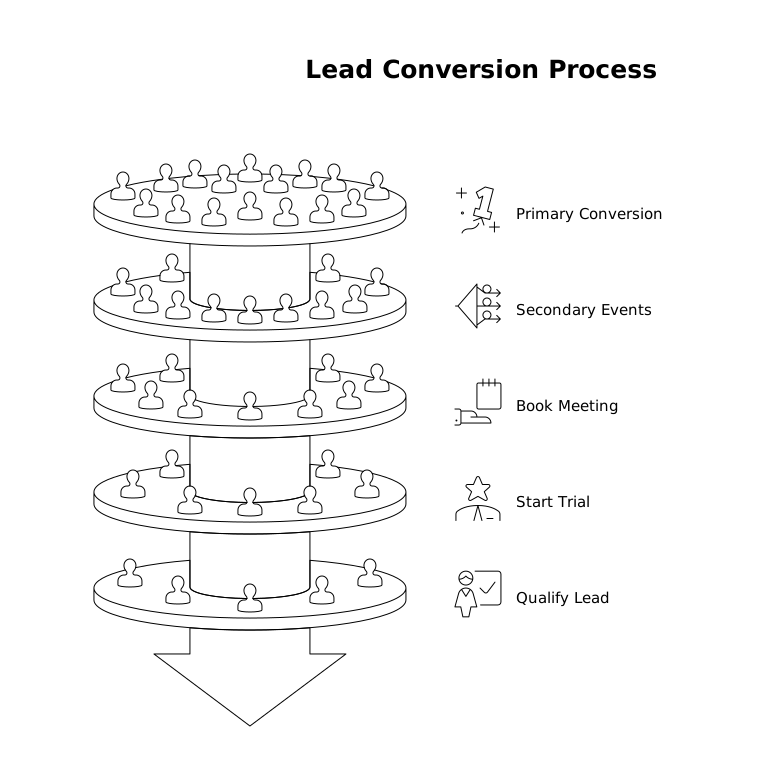
This prevents inflation when you import offline events back into ad platforms. It also makes reporting clearer: optimization events can exist without being treated as “new leads.”
Implement idempotency for server-side events and webhooks
If you send conversions server-side (or sync events to the CRM), you need an idempotency key so retries don’t become duplicates. A practical approach is to generate a stable event ID using inputs like:
- Normalized email (lowercased, trimmed)
- Event name (lead_created, demo_requested)
- Event timestamp rounded to a small window (e.g., 1–5 minutes)
- Form ID or page path
Store the event ID wherever the event is received (data warehouse or CRM integration layer) and ignore repeats. This single technique eliminates many “mystery doubles.”
Deduplicate in CRM using clear rules
Most CRMs can prevent or merge duplicates, but only if you align on what “same person” means. Typical rules include:
- Exact match on email (best for B2B)
- Normalized phone matching (strip punctuation, country codes)
- Fuzzy name + company matching as a fallback (with review)
Also decide what happens when duplicates are found: do you merge automatically, create a task, or route to ops? The goal is to stop duplicates from becoming multiple “leads created” metrics.
Preserve attribution data when you merge
When two records merge, attribution fields often get overwritten. Instead, keep a small attribution history (first-touch, last-touch, and the original click IDs) in dedicated fields or an associated table. This is one reason teams push their marketing and CRM data into a centralized, analysis-ready layer before reporting.
How to fix duplicates in reporting and pipelines
Create a single “source of truth” lead table
Even with perfect tracking, ads and analytics will still count conversions differently. The most stable reporting layer is a curated dataset where “unique lead” is defined once and reused everywhere: one row per person per defined window, with linked campaign and channel metadata.
This is where a marketing data infrastructure platform can help. Funnel.io is built for collecting and normalizing performance data from advertising, analytics, and CRM tools so you can standardize naming, align currencies, and calculate KPIs consistently before they reach dashboards or a warehouse.
Use “person key” and “event key” together
For clean deduplication you typically need:
- Person key: a stable identifier such as hashed email (or CRM contact ID if it’s reliably captured upstream)
- Event key: a stable conversion ID for idempotency and event-level de-dup
The person key prevents “one person counted twice.” The event key prevents “one submit counted twice.” Using both avoids the common mistake of deduping only at one layer.
Normalize channel and campaign naming before you join
Duplicate lead investigations often stall because “the same campaign” is spelled differently across tools, or because UTMs don’t match ad platform naming. Normalize campaign, source, medium, and account names first, then reconcile. If you want a deeper approach to measurement that holds up as discovery shifts into AI-assisted journeys, the methodology behind measuring AI recommendation share of voice is a useful companion: consistent entities and mappings beat ad-hoc labels.
Quick checklist to reduce shadow conversions this week
- Remove duplicate “lead” conversions (thank-you + submit) or clearly separate primary vs secondary goals.
- Capture click IDs in forms and pass them into CRM fields.
- Add idempotency keys to server-side conversions and CRM webhooks.
- Define CRM dedupe rules and a merge policy that preserves attribution history.
- Build a curated unique-lead dataset for reporting, not a raw event count.