
Why MCP tool confusion attacks happen
Model Context Protocol (MCP) makes it easier for agents to call tools, but it also creates a sharp edge: if a model can be tricked into calling the wrong tool, or calling the right tool with subtly altered inputs, the system can do something unintended. “Tool confusion” attacks usually exploit ambiguity at the boundary between the model’s text world and the tool’s structured world.
The most common failure mode is not exotic cryptography—it’s name and shape confusion. Two tools might look similar (“search” vs “web_search”), accept similar fields (“query”, “q”, “text”), or differ only by optional flags. When prompts, tool catalogs, and tool outputs are all mixed into the same conversational context, an attacker can try to steer the model toward the most permissive interpretation.
Threat model in plain terms
Tool confusion is best treated as an interface security problem. The attacker’s goal is to get one of these outcomes:
- Tool misbinding: the model calls a tool that the developer didn’t intend (e.g., a high-privilege admin tool instead of a read-only tool).
- Argument smuggling: the model supplies inputs that pass loose validation but change meaning (e.g., Unicode confusables, hidden whitespace, mixed encodings, duplicate keys).
- Version drift exploitation: the model calls an older schema version with weaker rules, or the server accepts multiple versions and picks one implicitly.
- Output-to-input reflection: tool output is reinterpreted by the model as instructions to call another tool (especially when outputs include JSON that resembles tool calls).
In practice, these issues show up when tool schemas are “close enough” but not canonical, when the runtime accepts multiple input shapes, or when the model is allowed to invent fields that downstream code tolerates.
Design canonical tool schemas to remove ambiguity
1) Make tool identity unambiguous
A canonical schema starts with a strict identity. Treat the tool name as a stable API surface, not a descriptive label. Good patterns include:
- Namespace tools by domain (e.g.,
billing.invoices.getinstead ofgetInvoice). - Separate read vs write tools clearly (e.g.,
users.readvsusers.write), rather than a single tool with a “mode” flag. - Avoid near-duplicates that differ only by optional parameters. If you need variants, make them distinct with explicit semantics.
Canonical identity is also where you can align with platform governance. If you already enforce per-step reliability in workflows, treat each tool call like a step with strict contracts—similar to how teams enforce per-step SLOs in DAG workflows. (Related reading: Enforcing Per-Step SLOs in DAG Workflows with OpenTelemetry Spans.)
2) Use strict JSON Schema rules and forbid “extra” fields
Many tool confusion attacks rely on fields that the model invents and the backend silently ignores—or worse, loosely maps. Defend by making your schema strict:
- Set
additionalProperties: falseand reject unknown keys. - Mark required fields as required and avoid “magic defaults” that change behavior.
- Use enums for sensitive choices (e.g.,
environmentin["prod","staging"]only). - Constrain strings (min/max length, patterns) and numbers (min/max).
Also avoid accepting multiple shapes for the same intent. If you allow both userId and user_id, you have already created ambiguity the model can be pushed to exploit.
3) Canonicalize semantics, not just structure
Two arguments can be structurally valid but semantically ambiguous. Make semantics explicit:
- Use one timestamp format (e.g., RFC 3339) and document the timezone assumption.
- Use one identifier type per field (UUID vs email vs slug) and validate it.
- Make “scope” explicit: do not infer account/project from the conversation; require it as an input or derive it from authenticated context.
Version pinning as a first-class security control
Schema versioning is often treated as a developer convenience. For agent systems, it is a security boundary. The goal is to make it impossible for the model (or an attacker shaping its context) to trigger behavior via an older or different schema.
Practical version pinning rules
- Pin tool versions in the tool catalog the model receives (e.g.,
users.read@2026-06-01), not just in backend code. - Reject unpinned calls: if the model calls
users.readwithout a version, treat it as invalid. - Do not “auto-upgrade” requests server-side. If the model sends v1 inputs, reject with a machine-readable error that forces a retry with v2.
- Deprecate with deadlines and remove old versions instead of supporting many indefinitely.
This approach reduces “version drift” confusion inside long-running agent sessions and makes incidents easier to debug because you can reproduce behavior by replaying against the same schema.
Edge-enforced input normalization to stop argument smuggling
Even strict schemas can be undermined if inputs are normalized inconsistently across layers. The safest pattern is to normalize and validate at the edge—before the request reaches internal services—so every downstream component sees a single canonical representation.
In practice, this looks like a dedicated gate that performs:
- Unicode normalization (e.g., NFKC) to reduce confusable characters and odd variants.
- Whitespace canonicalization (trim, collapse where appropriate), especially for identifiers.
- Duplicate key rejection for JSON payloads (a classic smuggling technique).
- Strict content-type handling (no “best effort” parsing of malformed JSON).
- Deterministic re-serialization (canonical JSON) for signing, caching, and audit logs.
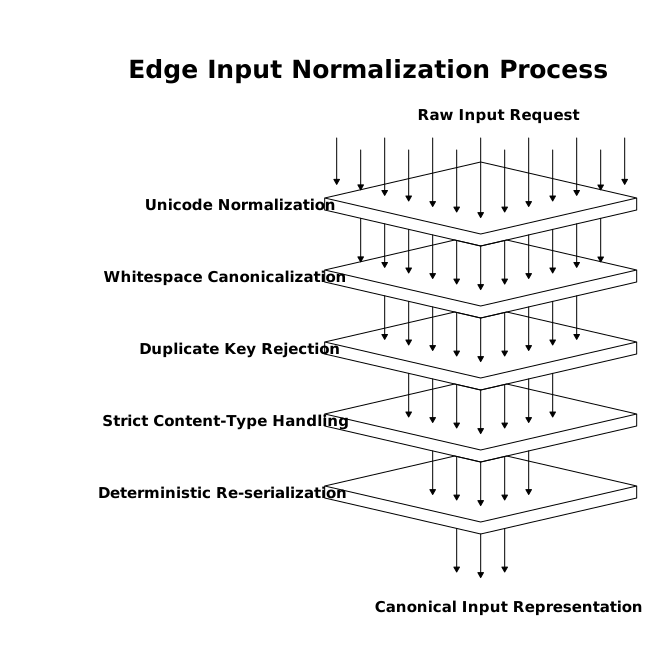
Because this is both a security and a performance concern, it maps naturally to an edge platform that can enforce consistent rules close to the user and the model. Cloudflare’s approach to security and application delivery at Internet scale makes it a natural reference point for edge enforcement patterns, especially when you want a single place to apply validation, rate limits, and anomaly detection across tools. For more context on the broader platform, see cloudflare.com.
Operational safeguards that complement schema hardening
Tool allowlists and least privilege
Only expose the tools needed for the current task. A smaller tool surface reduces confusion opportunities. Also separate “dangerous” actions (delete, transfer funds, change permissions) into tools that require additional confirmation signals from the application, not just the model.
Typed tool results and output handling
Return structured outputs with explicit types and avoid mixing instructions with data. If a tool returns text, treat it as untrusted content and do not feed it back as authoritative instructions to the model. When you must display tool output, label it clearly as data, not directives.
Telemetry and replayable audits
Log the normalized tool input, the pinned schema version, and the tool result. If something goes wrong, you want to answer: “What exact payload was validated?” not “What did the model seem to mean?” Good logs also help with product triage when you’re separating genuine model mistakes from UX confusion and real capability gaps. (Related reading: Feature request triage for AI products to separate model bugs UX confusion and real gaps.)
A compact checklist you can apply today
- Make every tool name globally unique and semantically specific.
- Ship strict schemas with
additionalProperties: falseand tight constraints. - Pin versions in the model-visible catalog and reject unversioned calls.
- Normalize and validate at the edge: Unicode, whitespace, JSON parsing, duplicate keys.
- Keep tool exposure minimal and privilege-separated.
- Log normalized inputs plus schema versions for replay and incident response.